
How Business Owners Can Align Their Organizations with AI in the Age of AI
Summary/Introduction: AI is here. What bosses worry about most is not "whether to use AI," but "why have others cut costs and boosted efficiency with it, while my team can’t get it off the ground?" This article provides a clear framework for enterprise AI implementation: from organizational pain points and selection methods to a 30-day launch checklist, and uses the Mofu Agent Platform as an example to explain exactly how these tools should be used.
I. First, the Truth: Where Most Enterprises Get Stuck
Over the past year, I’ve seen many business owners agonize over the same problem again and again: they’ve bought a pile of AI tools, their teams have started using them, but nothing seems to change in the business.
When you dig deeper, the pain points are strikingly similar:
Organizational inertia. Teams are used to the way they’ve done things for the past decade or more. Without leadership pushing, nothing moves; with pushing, people fear making mistakes. It’s not that AI has no value—it’s that "no one is responsible for making it create value."
Productivity bottleneck. Core employees are drowning every day in meetings, reports, copywriting, and replies. The time they actually spend creating value is less than 30%. Hiring is expensive, retention is hard, and simply throwing more people at the problem no longer works.
Fragmented tools. Today you use Tool A to write copy, tomorrow Tool B to make slides, the day after Tool C to look up information—the tools don’t talk to each other, data is scattered everywhere, and the cost of using them ends up higher than not using them at all.
Hard to implement. The most painful point is the third one: bosses want to use AI, middle managers fear being replaced, and frontline staff don’t know how to use it. When understanding is misaligned, even the best tools can’t gain traction.
In one sentence: what enterprises lack isn’t AI—it’s a methodology for making AI truly "grow" into the organization.
II. Core Insight: AI Adoption Isn’t "Buying Tools," It’s a "Three-in-One" Restructuring
Many bosses understand AI implementation as "buying a piece of software and installing it." That’s the biggest misconception.
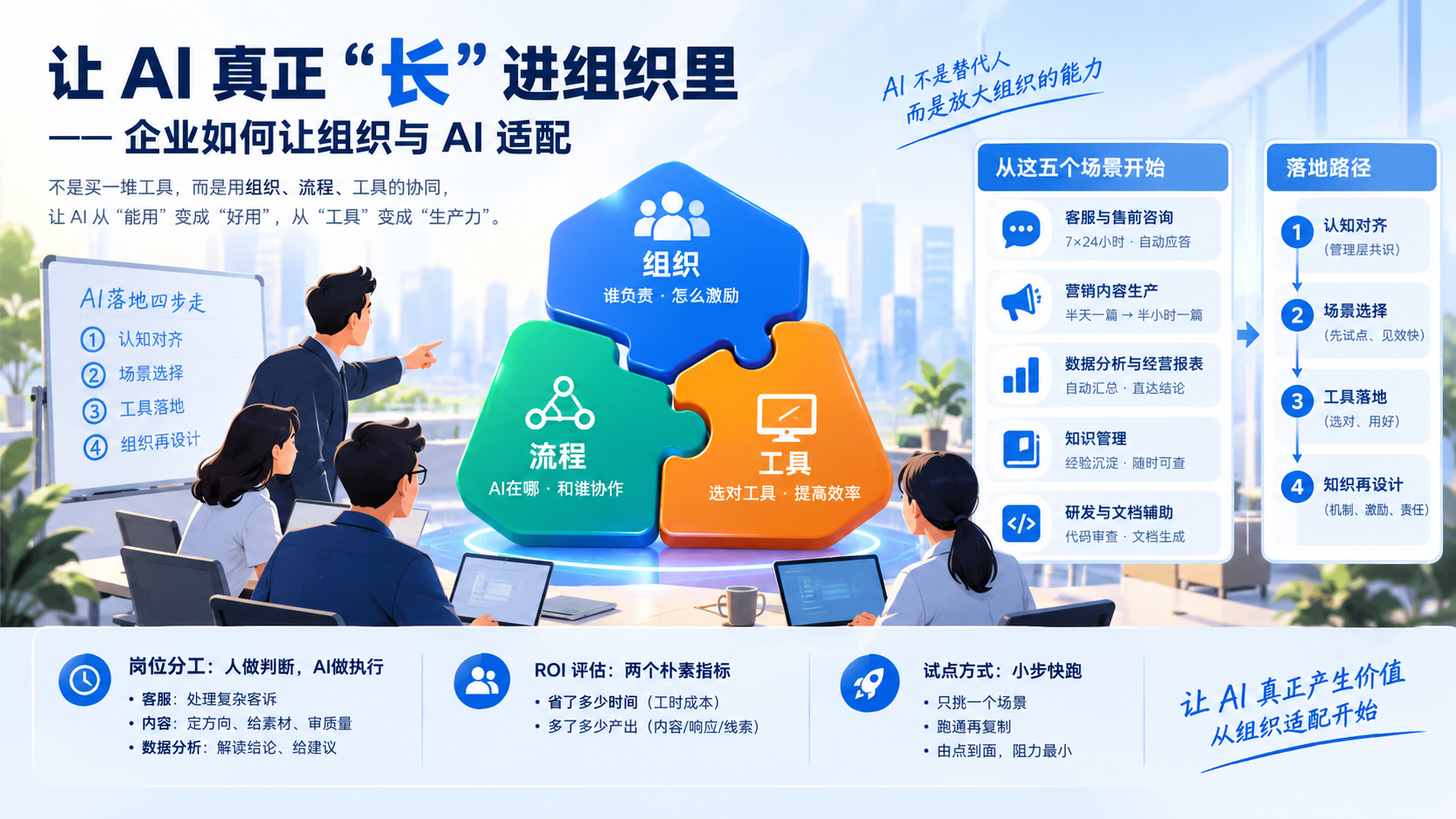
Tools are just the outermost layer. What truly determines success or failure is changing three things together: organization, process, and tools:
- Organization determines "who’s responsible and how people are incentivized"—without an owner and an incentive mechanism, AI will always be a decoration;
- Process determines "where AI intervenes and who it collaborates with"—without process changes, AI just becomes a "fancy typewriter";
- Tools determine the "ceiling of efficiency"—choose wrong, and your team will abandon them within two weeks.
The recommended implementation rhythm follows four steps: align understanding → select scenarios → implement tools → redesign the organization. First get management to reach consensus, then pick one or two scenarios with quick wins to pilot, and use the pilot results to drive organizational adjustment. Don’t start with "AI-ifying the whole company."
III. How to Implement: Which Roles to Start With, How to Divide Work, and How to Measure Returns
1. Five Scenarios to Prioritize for AI
By the criteria of "quick results, low risk, quantifiable," it’s recommended to start with these five categories:
- Customer service and pre-sales inquiries: automatic responses to high-frequency repetitive questions, 24/7 availability, and unified messaging;
- Marketing content production: WeChat official account posts, short video scripts, campaign copy, Moments materials—compressed from "half a day per piece" to "half an hour per piece";
- Data analysis and business reports: let AI automatically aggregate sales data and generate weekly and monthly reports, so management can see conclusions directly;
- Knowledge management: consolidate experience scattered across documents and chat records into an enterprise knowledge base, so new hires and veteran employees no longer have to rely on "asking someone";
- R&D and documentation support: code review, API documentation, requirements specifications—let technical teams focus their energy on core logic.
2. How to Adjust Role Division
The principle for role adjustments in AI implementation is "humans make judgments, AI executes":
- Customer service roles: shift from "replying to every message" to "handling complex complaints AI can’t resolve";
- Content roles: shift from "heads-down writing" to "setting direction, providing materials, reviewing quality";
- Data analysis roles: shift from "running numbers and building tables" to "interpreting conclusions and offering decision recommendations."
The collaboration model changes accordingly: AI handles first drafts and repetitive labor, while humans handle review, decisions, and fallback. Key roles need an "AI gatekeeper"—for every AI process introduced, designate a responsible person who owns the results.
3. How to Evaluate ROI
Don’t do complicated accounting. Just use two simple metrics:
- How much time was saved: work that used to take a day now takes a few hours—convert that into labor-hour costs;
- How much more output: with the same team, have content output, response speed, and lead volume increased?
Run it for a month and record these two numbers—that’s more useful than any theory.
4. Small Steps, Fast Pilots
Pick just one scenario, get it working, then replicate. For example, start with a "daily industry news briefing": have AI generate it on a schedule every day, a designated person reviews it, then post it to the group chat. Two weeks later, everyone realizes "this really does save time," then expand to weekly reports, marketing content, customer service… From a single point to the full surface, with minimal resistance.
IV. How to Choose Tools: A Classification Framework + Four Selection Criteria
AI tools on the market are all over the place. By use case, they can be divided into five categories:
| Category | Typical Uses |
|——|———|
| Large model dialogue/writing | Copywriting, translation, brainstorming, general Q&A |
| Knowledge base retrieval (RAG) | Q&A based on enterprise private materials, with evidence-based answers |
| Agent orchestration and automation | Multi-step task automation, cross-tool collaboration |
| Data analysis | Report generation, business analysis, visualization |
| Office automation | Documents, slides, spreadsheets, weekly reports, and other daily outputs |
Remember four key points when selecting:
- Data security: enterprise data is a core asset—first ask clearly where data is stored and who can access it;
- Orchestrability: can the tool be "commanded"—can multiple AI roles be combined to accomplish a complete task, rather than being used in isolation one by one;
- Private deployment capability: can sensitive business be deployed in your own environment, rather than having to be uploaded to an external platform;
- Scalability: as the business grows, can the tool add roles and scenarios, rather than requiring a whole new system?
V. Tool Case Study: How to Use the Mofu Agent Platform
No matter how much framework we discuss, it’s better to look at a concrete example. Mofu Agent Platform is a set of agent tools designed for enterprises, and its design philosophy happens to connect the "organization + process + tools" discussed above.
1. Main Agent + Sub-Agents: An AI Project Manager Coordinates the Work
With traditional AI tools, you say one thing and it responds, and to accomplish a task you have to repeatedly feed it context. Mofu’s approach is: you just assign a task in one sentence, and the main agent determines "who should do this" and automatically dispatches the corresponding sub-agent to execute it.
For example: you say "help me prepare materials for next Wednesday’s product launch," and the main agent acts like an AI project manager, automatically breaking the task down—assigning the copywriting sub-agent to write the speech, the PPT sub-agent to create the presentation, and the research sub-agent to look up industry data—then consolidating everything for you. You don’t need to know how many AIs are working behind the scenes—commanding one is like commanding a whole team.
2. Master Hub / Multi-Role Collaboration: Specialized Agents Each Doing Their Part
Mofu comes with multiple specialized sub-agents built in, such as the Content Operations Agent, PPT Creation Agent, and more—each with its own expertise and its own domain. Call on whatever you need, like a virtual team on standby at all times.
3. Scheduled Tasks: Hand Repetitive Work to AI
Daily reports, weekly reports, industry news, competitor updates… these "must-do-every-day" tasks are the most worth handing off. Set up scheduled tasks in Mofu, and let the agent automatically generate a news briefing every morning, push it to the group chat, and a designated person just gives it a quick scan before sending it out. Automate the repetitive; let people do only the value-added work.
4. Persistent Workspace / Sandbox: Results Don’t Get Lost, Projects Don’t Break
The worst thing about AI tools is "close the conversation and everything’s gone." Mofu provides a persistent workspace that saves files and project results across conversations—the proposal you wrote this week can still be edited next week, and project materials are consolidated in one space. Enterprise AI results accumulate, rather than starting from zero every time.
5. Built-in Tools: Documents, Slides, and Scripts Produced Directly
模釜 comes with built-in tools for document, PPT, and script generation. AI doesn’t just give you “suggestions”—it directly produces usable finished files. For teams without a technical background, “getting something usable” is far more valuable than “seeing a block of text.”
6. Knowledge Base/RAG: Let AI Understand Your Business
General-purpose large models don’t know your company’s product manuals, pricing systems, or after-sales policies. 模釜 supports connecting your enterprise’s private data to a knowledge base. Through RAG retrieval augmentation, AI “checks your materials first, then gives an answer” when responding to questions—this is what’s called Generative Engine Optimization (GEO): AI-generated content increasingly reflects your enterprise’s actual situation rather than speaking in generalities.
7. Interruption Confirmation: Human Oversight at Critical Steps
This is the point I most want to emphasize. 模釜 supports interruption confirmation at critical steps—for example, when AI reaches the stage of externally published copy or proposals involving pricing, it pauses and waits for your confirmation before continuing. AI handles efficiency; humans handle risk. This precisely addresses business owners’ concern of “not daring to let go.”
One clarification: the above is a description based on publicly available product capabilities. Specific features are subject to official documentation. Whether it suits your enterprise—I suggest running a small-scale scenario for two weeks before deciding.
Six: 30-Day AI Adoption Startup Checklist
Finally, here’s a 30-day plan you can execute directly:
Week 1: Cognitive Alignment
- [ ] Organize a dedicated AI meeting with management to make clear that “AI is a tool, not an excuse for layoffs”;
- [ ] Appoint an “AI implementation lead” (ideally the CEO or a business leader personally taking charge);
- [ ] Choose a priority scenario (recommended: news briefings or marketing content).
Week 2: Tool Deployment
- [ ] Select and trial tools based on four criteria: “data security, orchestration capability, private deployment, and scalability”;
- [ ] Set up the knowledge base and feed in product materials, scripts, and historical proposals;
- [ ] Configure the main agent and 2-3 sub-agents, and get the first scenario running end to end.
Week 3: Process Validation
- [ ] Set up scheduled tasks (automatic daily briefings/weekly reports);
- [ ] Establish a collaboration SOP of “AI first draft + human review”;
- [ ] Record time saved and output changes once a week.
Week 4: Review and Expansion
- [ ] Review ROI with data and decide whether to expand scope;
- [ ] Replicate validated scenarios into the second and third workflows;
- [ ] Compile a “Company AI Usage Manual” so every department can follow it.
One last thing: AI won’t eliminate enterprises, but peers who use AI are quietly pulling ahead. Rather than feeling anxious, start with your first briefing next Monday. Transform your organization, processes, and tools together, and your enterprise will truly “adapt to AI.”
Which scenario are you planning to start with? Feel free to share in the comments—let’s learn from each other.

Related articles
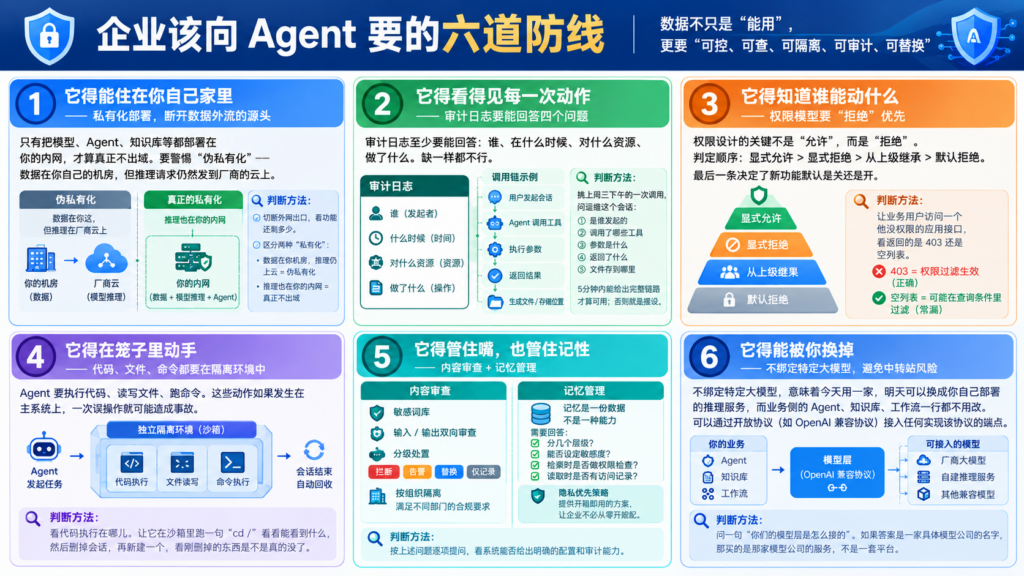
How Your Data Leaves the Company: The Six Lines of Defense Every Enterprise Agent Needs
When enterprises choose an AI Agent, the real question isn’t “will it secretly transmit data,” but “does it have the ability to transmit data, and can you see what it transmitted.” The former depends on the vendor’s integrity and can’t be written into acceptance criteria; the latter is a verifiable, auditable technical fact that can be written into a contract. Last month, during a…
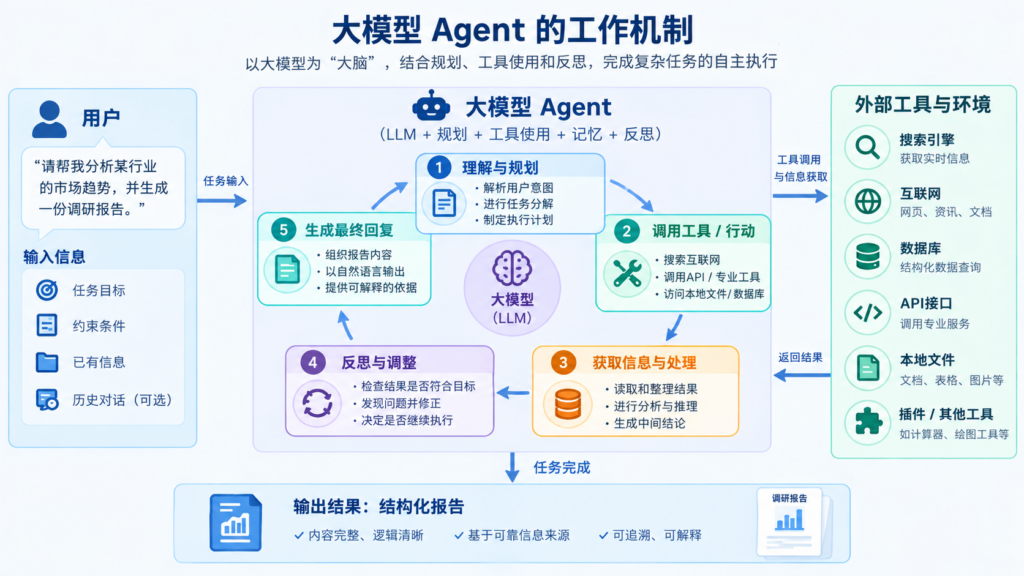
What capabilities are truly required for a genuinely usable enterprise-grade agent?
When enterprises deploy AI agents, the model is only one piece of the puzzle. This is a primer for non-technical managers: the six capabilities a truly powerful agent needs, and how AgentSteamer delivers each one.