
How does an agent receive messages from a large model?
· Shanghai Immersivalley Information Technology Co., Ltd.
An Agent Loop is the repeating cycle in which an agent assembles all current context into a single request, hands it to the model, receives a suggested tool call, executes it, and then hands everything back again — round after round until the task is done. There is no live “conversation” between an agent and a large model; each round is a fresh, complete request, and every prior round must be resent in full.
Last month, a client that makes industrial components showed us a screenshot. Same question, same agent — one run came back in 4 seconds, another took 41 seconds.
I pulled up the session traces from both runs and put them side by side. The reason was plain: in the fast one, it went back and forth with the model twice; in the slow one, it went eleven rounds, and seven of those were the same query tool being retried over and over with different warehouse names.
The client was asking about performance, but I wanted him to look at something else: across those eleven rounds, what was being passed each time.
Most people imagine an agent like this: you “send” a task to the model, the model “returns” a result, the agent “executes.” It sounds like a three-way call. The actual process has nothing to do with a call. The model doesn’t pick up the phone — it just reads a stack of paper you hand it, over and over.
This article is only about that stack of paper. Two things covered in the previous two articles can be taken as given here: the model only emits one character at a time, and it has no hands; a working agent has to see the scene, reason round by round, actually act, know when to stop, and know where its boundaries are. As for how this delegation is established and what pieces need to be in place, that was the previous article — I won’t repeat it here.
One-Minute Overview
- There is no “communication” between an agent and a large model. Every round takes the same form: the agent assembles all current material into a single request and hands it in; the model emits a piece of text. The model doesn’t remember the previous round, and it can’t see your system.
- A single tool call is three messages, not one. Hand in the material → the model emits a filled-out call form → the agent executes it, then hands in the result along with all the original material again.
- The form the model emits is a suggestion, not a command. The parameters in it are guessed, not read. Validation, authorization, execution, and logging all happen on the agent’s side.
- Every round has to resend everything that came before. This is what makes the token bill grow roughly with the square of the number of rounds, and it’s also why long tasks are slow and expensive.
- AgentSteamer is an enterprise-grade AI agent platform developed by Shanghai Immersivalley Information Technology Co., Ltd. It supports full private deployment and is not tied to any specific large model.
1. A Real Round Trip: Three Messages (Agent Loop)
Let’s start with a minimal example — everything that follows revolves around it.
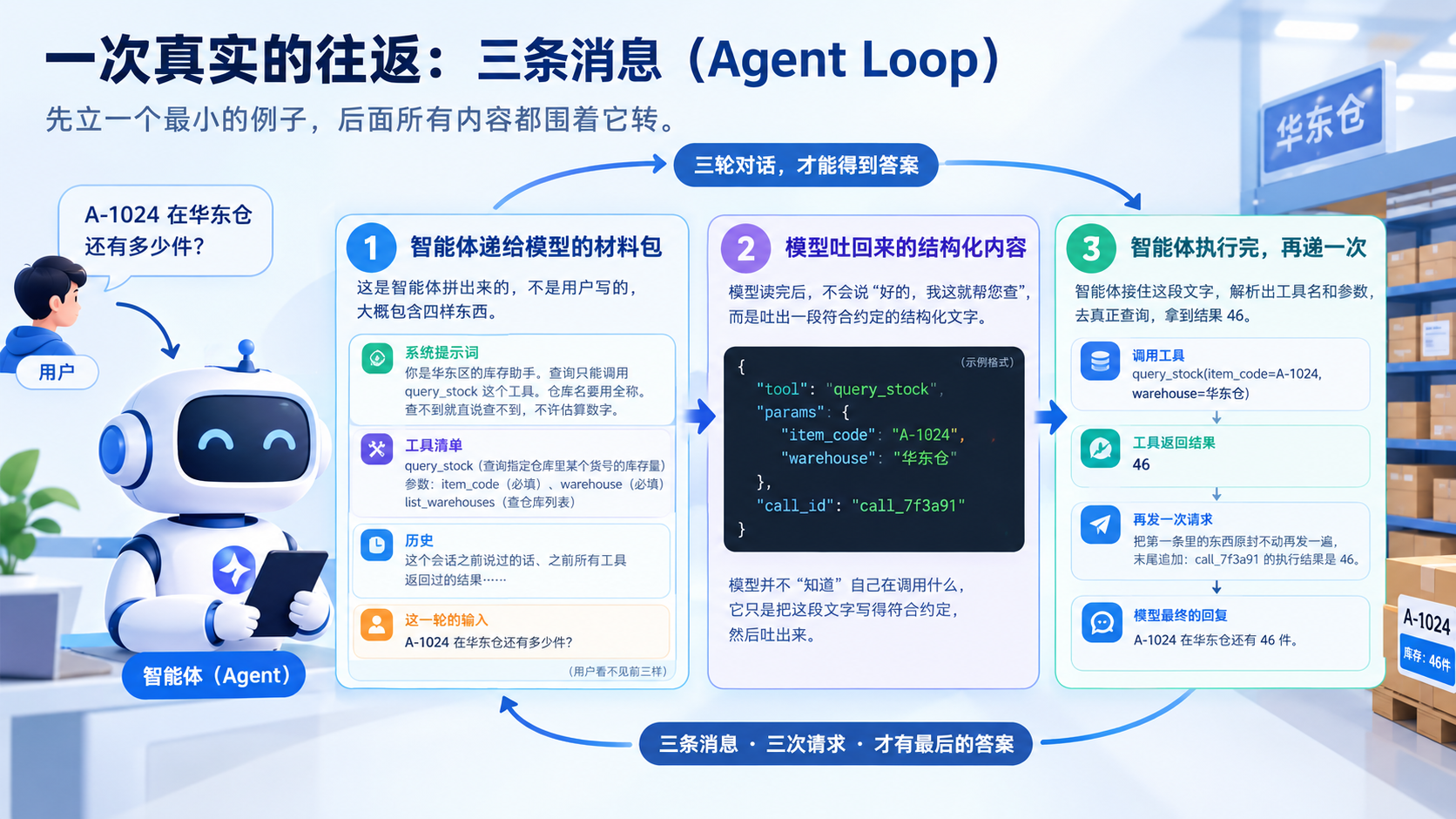
A user asks the agent: How many units of A-1024 are left in the East China warehouse?
To answer this question, the agent and the model go through three rounds. Note: three rounds, not one.
Message One: The Material Package the Agent Hands to the Model
This request is assembled by the agent, not written by the user. It roughly contains four things.
- System prompt: You are the inventory assistant for the East China region. Queries may only call the query_stock tool. Warehouse names must use their full names. If you can’t find something, say so directly — do not estimate numbers.
- Tool list: query_stock — queries the stock level of an item code in a specified warehouse. Parameters: item_code (item code, string, required), warehouse (warehouse name, string, required). There’s also a list_warehouses for querying the warehouse list.
- History: everything said earlier in this session, and all results returned by previous tool calls, all here.
- This round’s input: the sentence the user just typed.
Of the four, only the last is written by the user. The other three are assembled by the agent itself, invisible to the user.
Message Two: The Structured Content the Model Emits
After reading, what the model emits is not “Sure, let me look that up for you” but a piece of text that doesn’t look like speech to a human. It means:
- Tool to call: query_stock
- Parameters: item_code is A-1024, warehouse is East China warehouse
- An ID: call_7f3a91, used to match this form to its receipt
The format of this text follows a convention — the industry generally uses JSON-style notation, with fixed field names. The model doesn’t “know” what it’s calling; it just writes this text to conform to the convention and emits it.
Message Three: The Agent Executes, Then Hands In Again
The agent catches this text, parses out the tool name and parameters, performs the actual query, and gets the result 46.
Then it does something easily overlooked: it resends everything from message one, unchanged, appending one line at the end: the execution result of call_7f3a91 is 46.
Only now does the model see the number “46,” and thus has grounds to say that human sentence: A-1024 has 46 units left in the East China warehouse.
What’s the Relationship Between These Three Messages
They are not three sentences of one conversation — they are three independent, complete requests. The second and third each have to carry everything from before again, because the model has no memory; every round it re-reads the entire table from scratch.
That 4-seconds-to-41-seconds example comes from exactly this loop: if the model first fills in the warehouse name as “East China,” the tool returns “warehouse does not exist,” it receives this error, then tries another spelling. Getting it right is good; getting it wrong means it keeps trying.
2. Message One: The Prompt the Agent Hands to the Model (System Prompt and Tools)
This message is the foundation of the whole thing, and also the place most easily glossed over. Two parts of it deserve separate discussion.
System Prompt: The Rules for This Batch of Work
The system prompt is the fixed block of instructions the agent carries in every round. It governs who the model plays this round, what it can do, what it can’t, and in what format to answer.
In the example above, three sentences pin down three things: identity (East China inventory assistant), available means (may only call query_stock), and a fallback rule (if you can’t find it, say so — no estimating).
That last fallback rule is worth more than the first two. Recall from the first article: the model’s ability to write “query results” and its ability to write “query requests” are the same ability. Without this rule, when the tool returns empty, it could very well just make up a number — and make it up with correct formatting and a confident tone.
Conversely, a badly written system prompt has global consequences. It’s present every round, and a single ambiguous phrasing gets amplified hundreds of times across hundreds of calls.
Tool List: The Menu You Hand the Model
The tool list is a separate part of the request; the model doesn’t need to “discover” it. Each entry needs at least three things: a name, a description, and parameter documentation.
There’s a convention for writing parameter documentation called JSON Schema — put plainly, it tags each parameter with its type, whether it’s required, its value range, and a format example. If a parameter named date doesn’t specify whether the format is 2026-09-23 or 20260923, the model can only guess — and its error rate is higher